1. Our team will reach out in <30 minutes.
Check your inbox or phone, we’ll tailor your demo to your use case.
2. We build your custom demo
Flowcodes, FlowURLs, and FlowHubs with the data behind the whole platform - so you see exactly what Flowcode unlocks.
3. You go live in days
Our team handles setup. You handle growth.









.webp)
























.png)




.png)




.png)



.png)

.png)

%20copy%203.png)




.png)



Feature Release Log
Keep up with Flowcode’s latest product news, or subscribe to be the first to know when new releases and updates go live.
You're in. You’ll hear from us in the next 30 minutes.
A real person is reviewing your info. In the meantime, see how teams launch and scale with Flowcode.
How teams launchOops! Something went wrong while submitting the form.
September 2026
Custom Dashboards
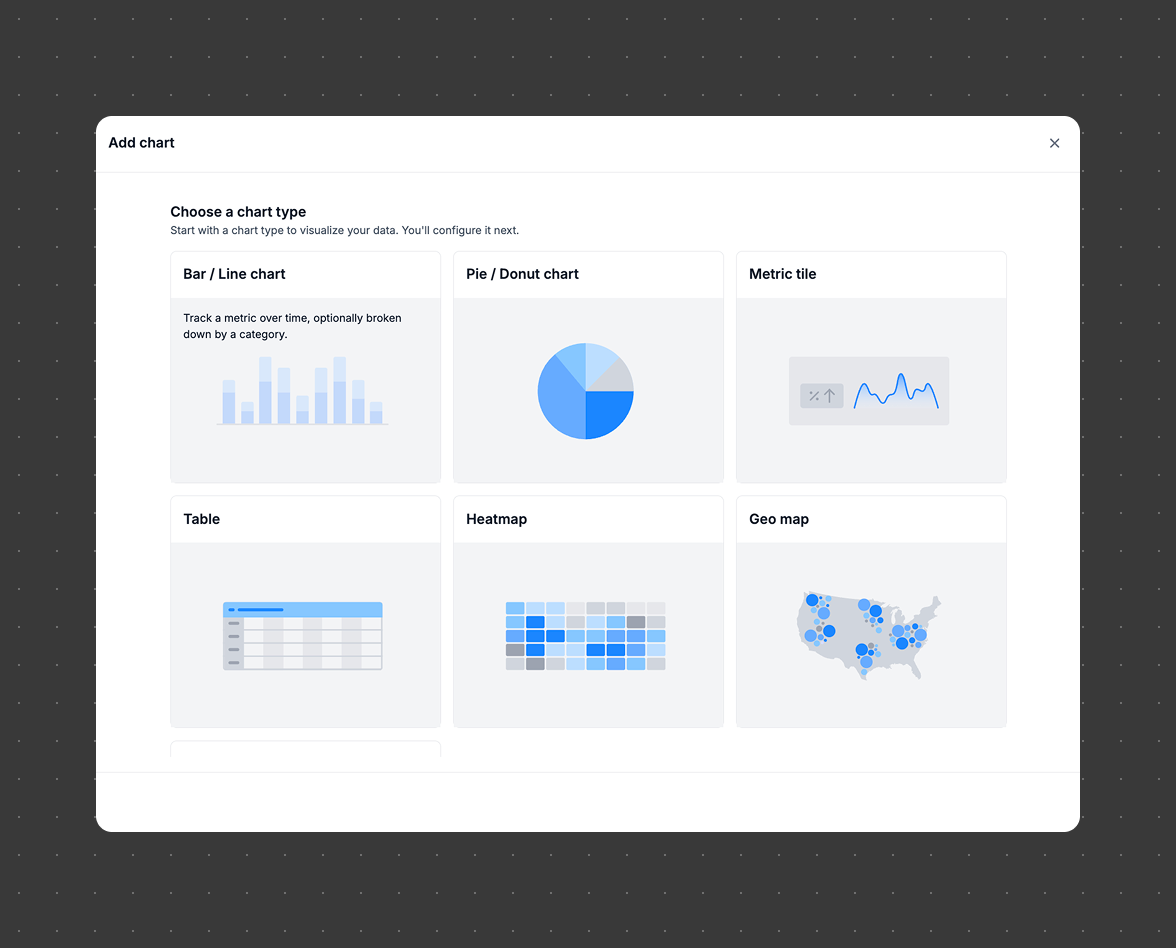
Build and share insights without the need for a data engineering or analytics team. Custom Dashboards gives marketers and business users a self-service reporting platform to drag and drop charts, apply filters, and schedule reports all on their own.
September 2026
Bulk Dropdown Options
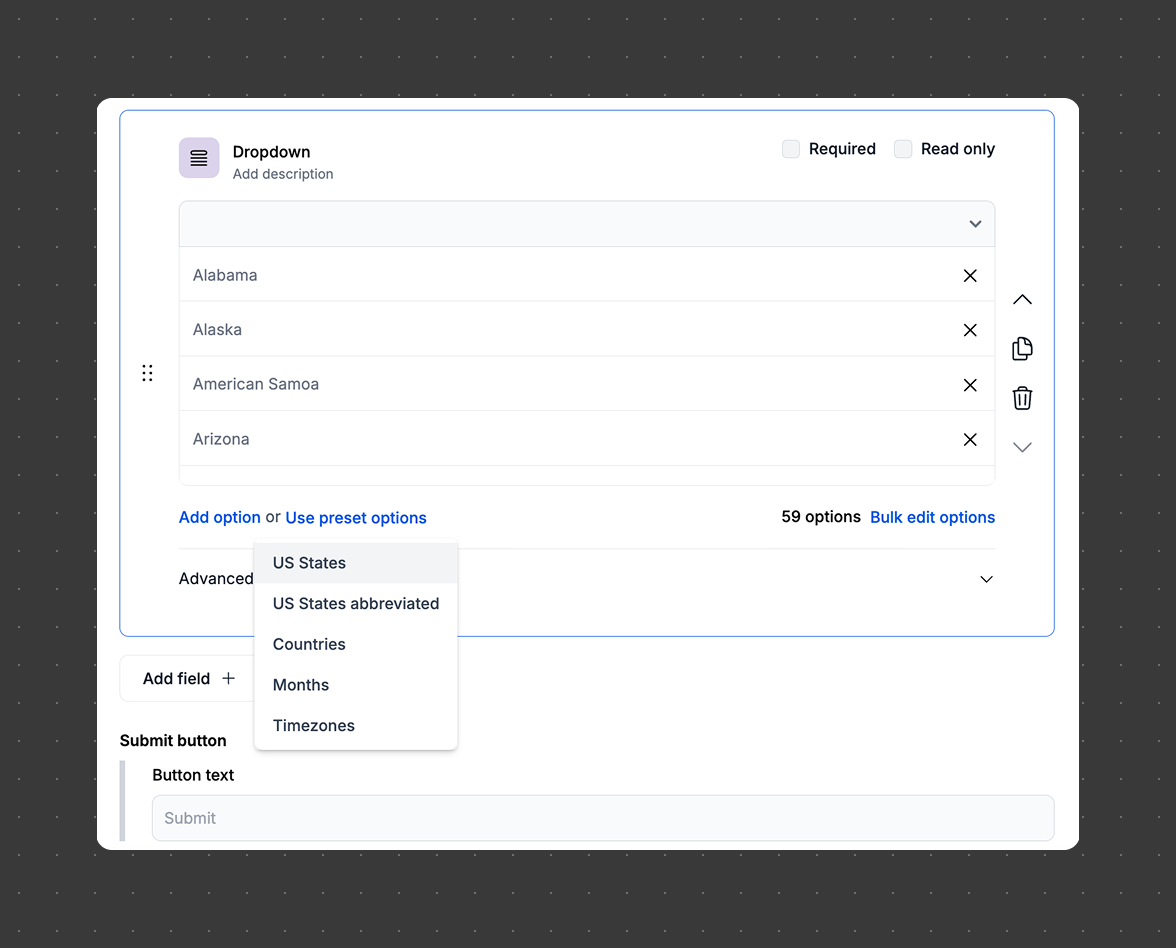
Form builders can now paste or bulk-load large option lists into dropdown fields in seconds, and consumers can search long dropdowns by typing to filter, making complex forms faster to build and easier to use.
September 2026
Form Results Tab
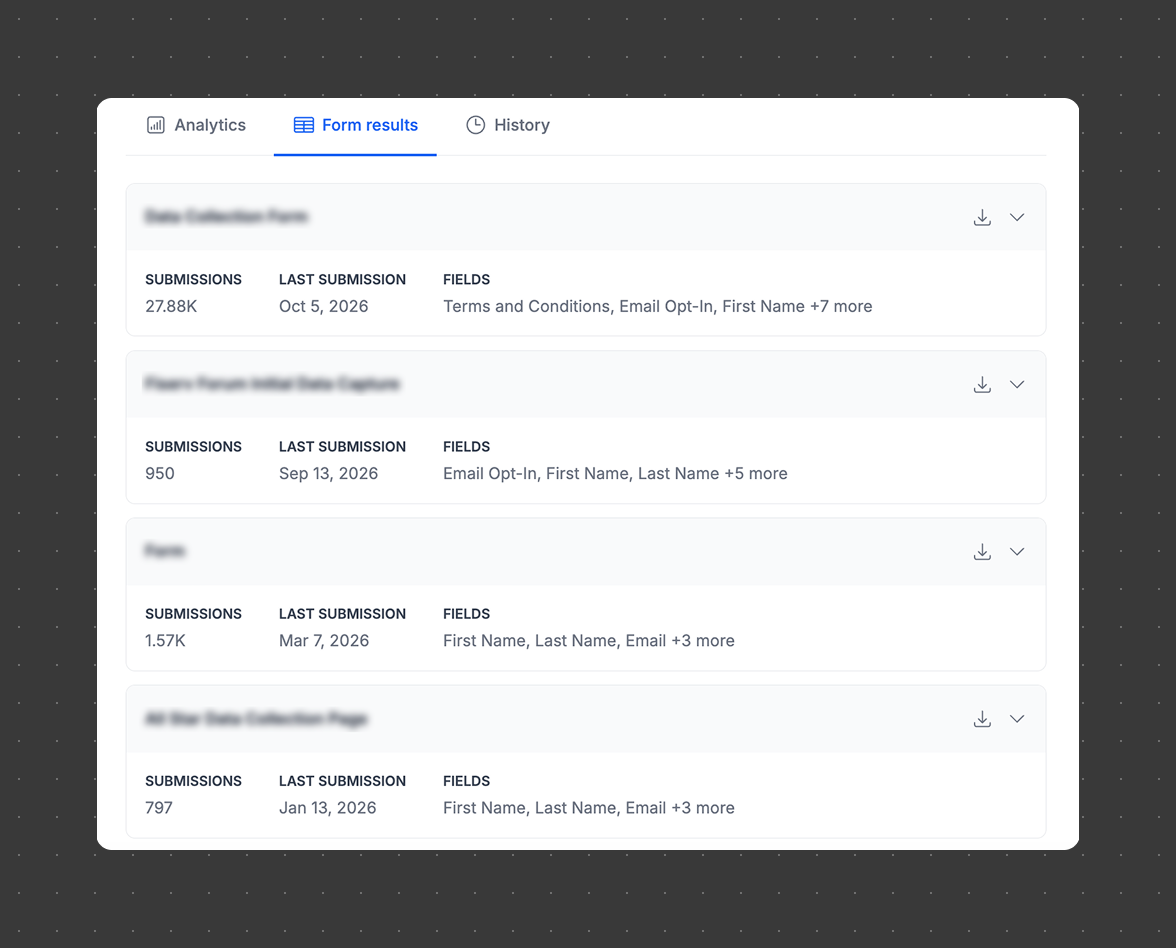
The Form Results tab has been redesigned to organize each form module into its own clearly labeled section, making it easier to see submission counts, filter by contact, and download results per module without sifting through a cluttered list.
July 2026
Data Property Types
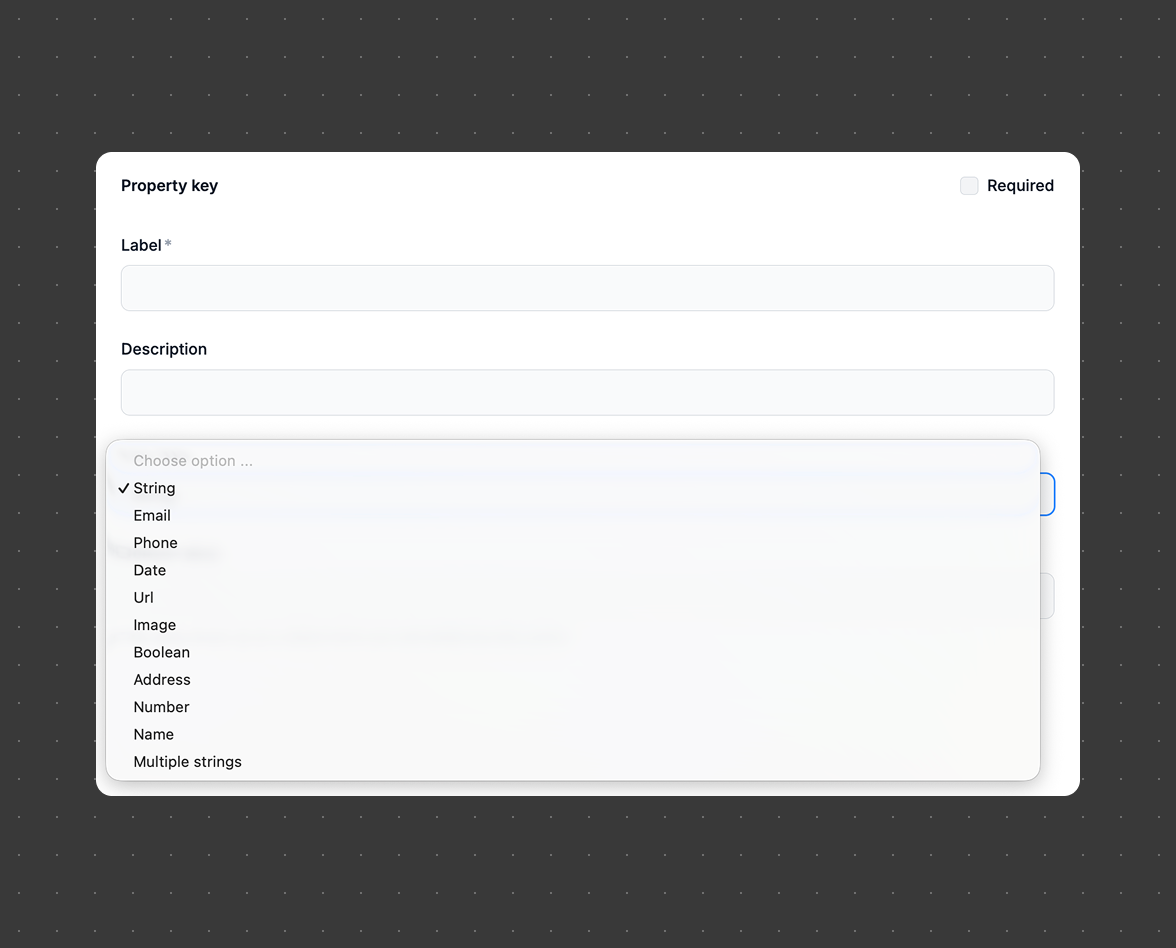
Data properties can now be assigned a specific type (email, phone, URL, address, date, number, etc.), so they insert correctly into typed fields without triggering validation errors.
May 2026
Change your Primary Identifier

Align with your existing data systems and go beyond email with subscriber IDs, loyalty IDs, or hashed emails to identify your FlowID contacts.
May 2026
Shopify Revenue Pixel

Link your Flowcode connection data with your store's purchase activity and see the full journey from physical touchpoint to checkout.
May 2026
GS1 Code Templates

Flowcode supports GS1-compliant codes, enabling you to generate codes scannable by both consumer smartphones and retail/supply chain barcode scanners. No external tools or workflows required.
April 2026
Smart Rules for Modules

Extend the power of Smart Rules to individual modules within a flow, enabling personalized experiences at a more granular level. You can now apply logic, such as device type (iOS vs. Android), to dynamically adjust links and content, delivering smarter routing beyond the primary conversion path.
April 2026
Sweepstakes Form Enhancements

Sweepstakes forms now support submission limits, along with duplicate-entry prevention, giving you greater control over access and data quality. These settings can be configured directly in the Form Editor to define campaign windows, cap entries, and prevent repeat submissions.
April 2026
Left Navigation Redesign

The Flow Editor navigation has been simplified by moving key controls directly into the canvas, removing the separate left-hand navigation panel. All entry points (QR codes and FlowURLs) and data properties are now visible in one unified and streamlined view.
April 2026
API and Bulk Import Improvements
Bulk imports and API code creation are now dramatically faster and more reliable. Large jobs that previously took 15–20 minutes now complete in seconds, while backend improvements prevent partial failures and reduce platform slowdowns during large imports.
January 2026
The Asset Library

The Asset Library introduces a dedicated hub within the new Assets tab for managing image assets within workspaces. Users can now bulk upload, organize images into folders, rename, archive, and manage assets with workspace-level permissions, creating a centralized and scalable system for asset organization and reuse.
January 2026
Post-Submit Communications
Post-Submit Communications enables automated email notifications triggered by CRM form submissions, configured directly in the Flow Editor. This feature helps brands quickly engage users after submission with personalized, conditional messaging, driving faster follow-up and higher conversion.
January 2026
Custom Tables

Custom Tables give you full control of your reporting by building the exact analytics view you need on demand. Choose your own dimensions and metrics to uncover deeper performance insights and go beyond standard dashboards with more granular analysis. Add Custom Tables to your scheduled reporting and skip the wait for custom exports or technical help, with instant self-serve reporting built right in.
Learn More
January 2026
Self-Service Pixel
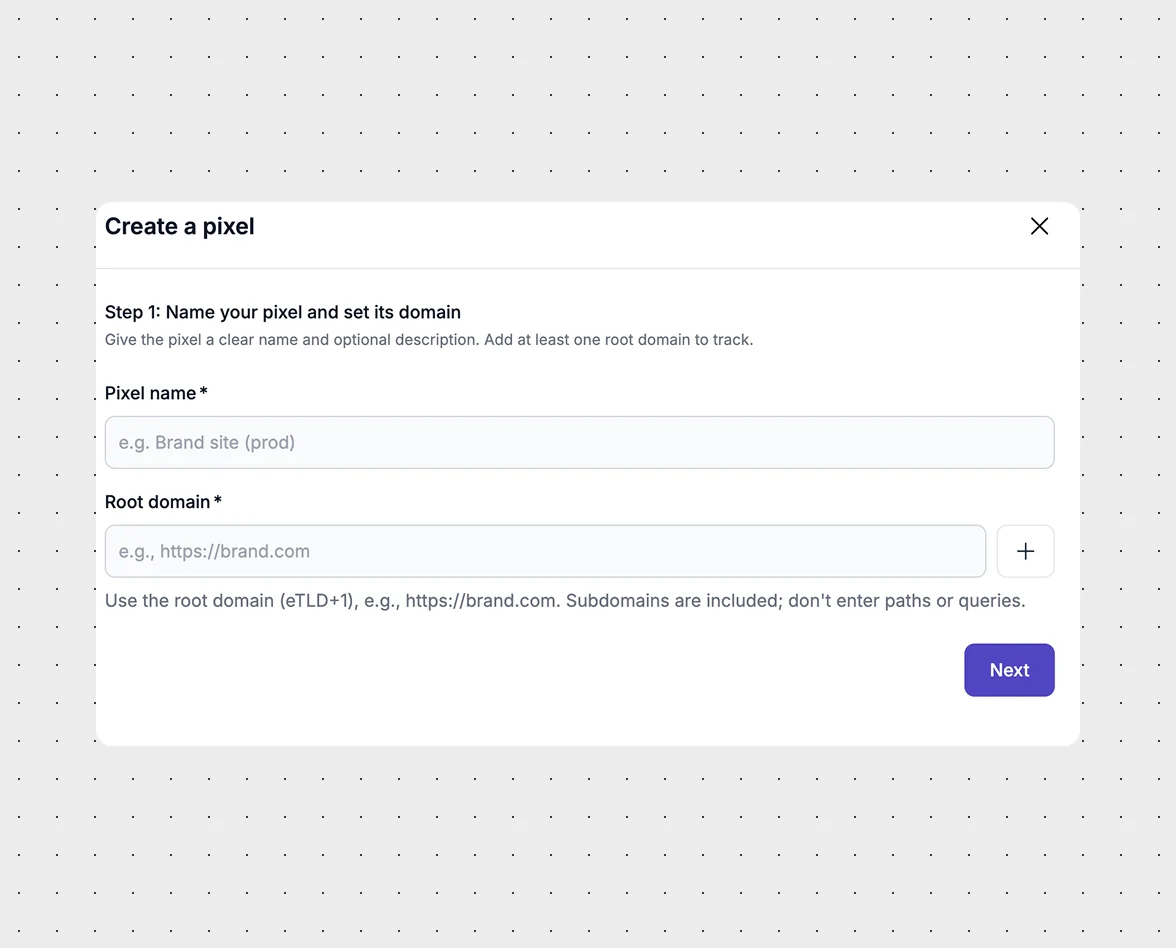
We updated the Flowcode 2 Pixel to be fully self-serve, making it easy to generate and manage your tracking pixel directly in the platform. Set it up in minutes with no technical support required.
January 2026
Audience Builder Updates
The Audience Builder UI has been updated to make creating groups faster and easier. Group logic functionality has also been improved so contacts can be included regardless of whether they converted within the selected time frame.
January 2026
BYO OneTrust Footer Banner

Flowcode-owned pages now include persistent footer links for Cookie Preferences, Report, and Privacy to support OneTrust compliance. Clients with a DPA can override the Cookie Preferences and Privacy links with their own OneTrust-managed and privacy policy URLs.
December 2025
SmartFlow
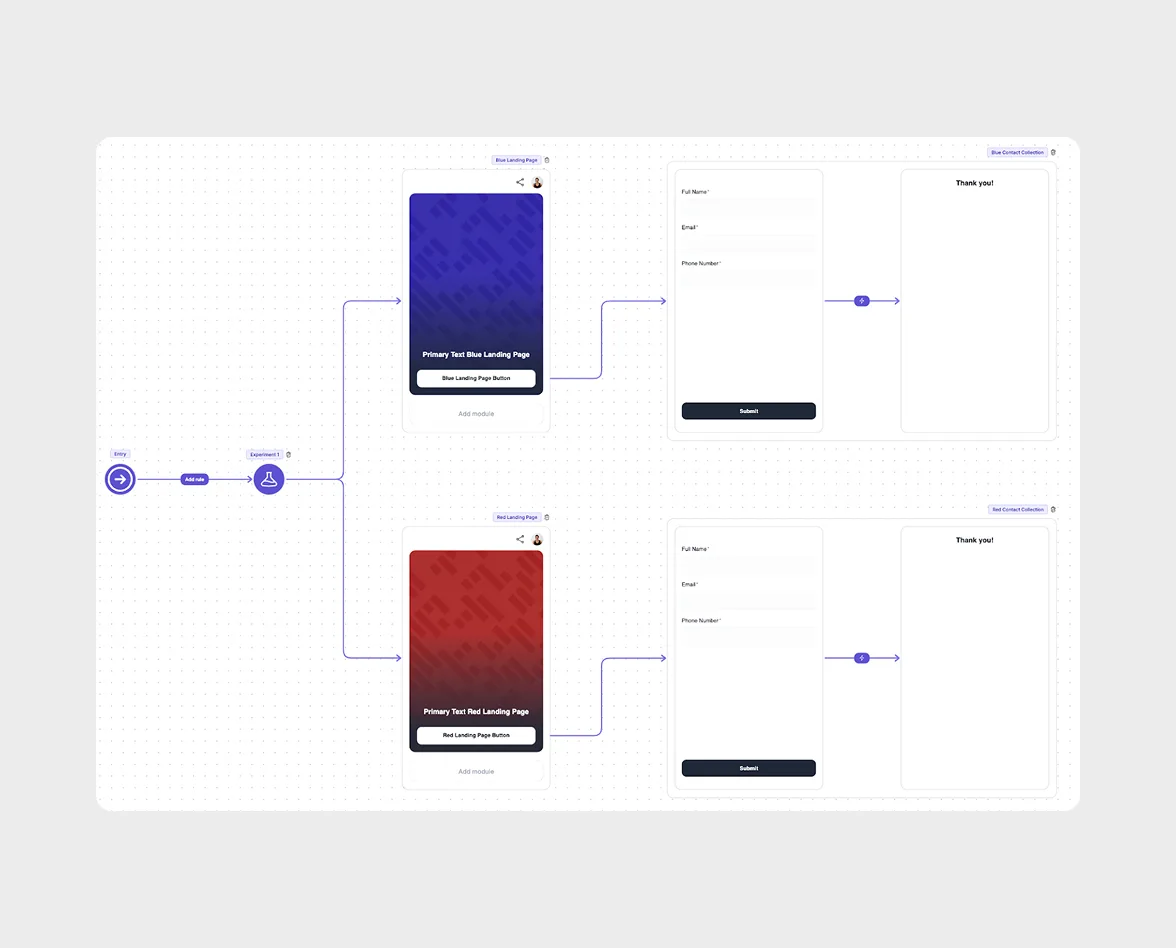
SmartFlow automatically routes visitors to the best-performing landing page variant while your test is still running, reducing wasted traffic and lowering cost per acquisition. Ideal for product drops, game days, and seasonal campaigns that need fast optimization.
December 2025
Flow-Level Analytics Enhancements
A redesigned analytics view brings clearer insights. Simplified top-level metrics, updated conversion rate calculation (Conversions ÷ Visits), richer tables, including Total Conversion Rate and Module Conversion Rate, and new geo-data views and a detailed “Traffic Breakdown” section.
December 2025
Revenue Tracking for Conversion Pixel
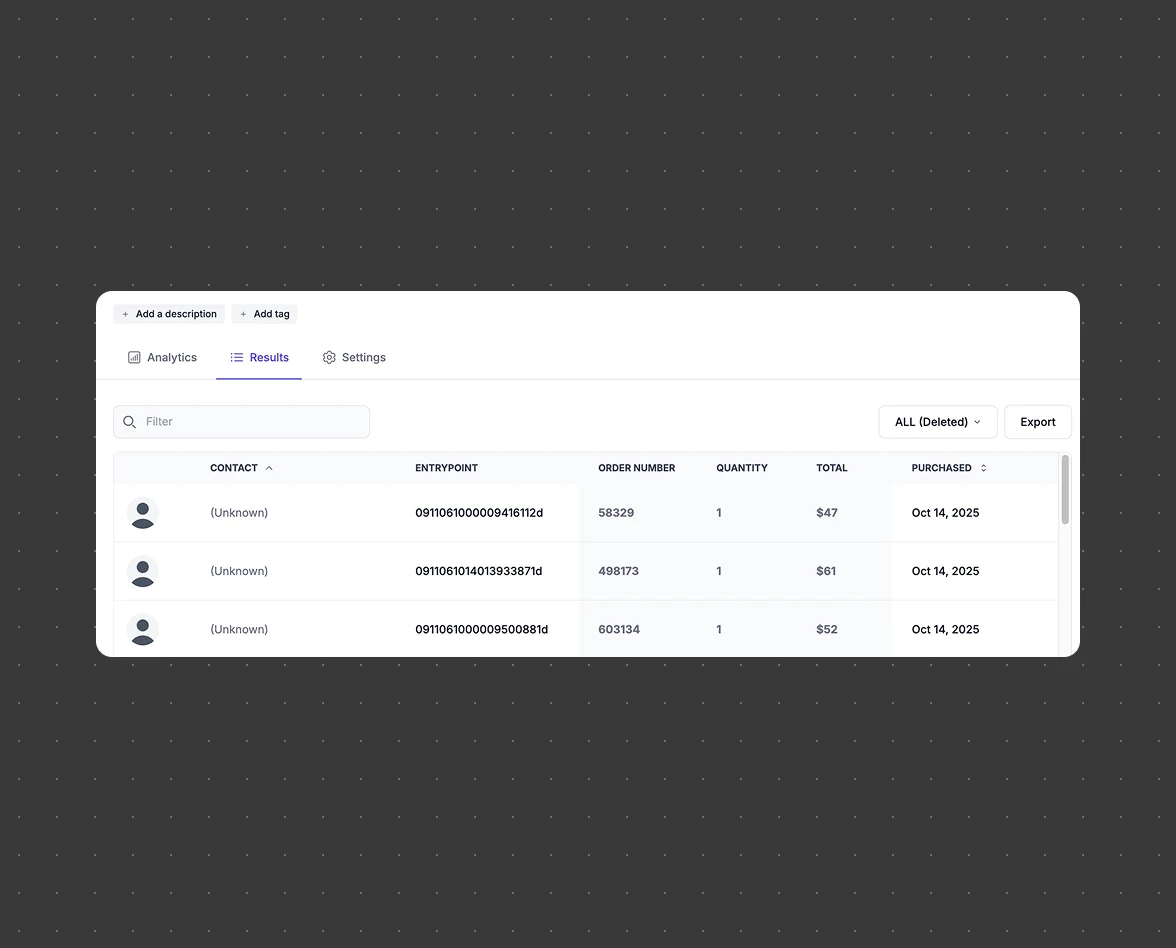
You can now see transaction totals, quantities, and order numbers alongside conversions, making ROI measurement clearer and enabling smarter optimization.
December 2025
Scheduled Reports: Admin View & Results Tab

Admins can now view and manage all scheduled reports across orgs and workspaces, including ownership, cadence, and delivery settings. Improves visibility and continuity when team structures change. Scheduled reports can now include form results, with a new “Include results of the flow” toggle. Reports will include module-level CSVs for deeper insight into submissions.
December 2025
FlowID HubSpot Audience Sync
FlowID Audiences can now automatically sync to HubSpot Lists: keeping contacts, campaigns, and CRM data continuously aligned with no manual work.
December 2025
Asset Counts Within a Flow
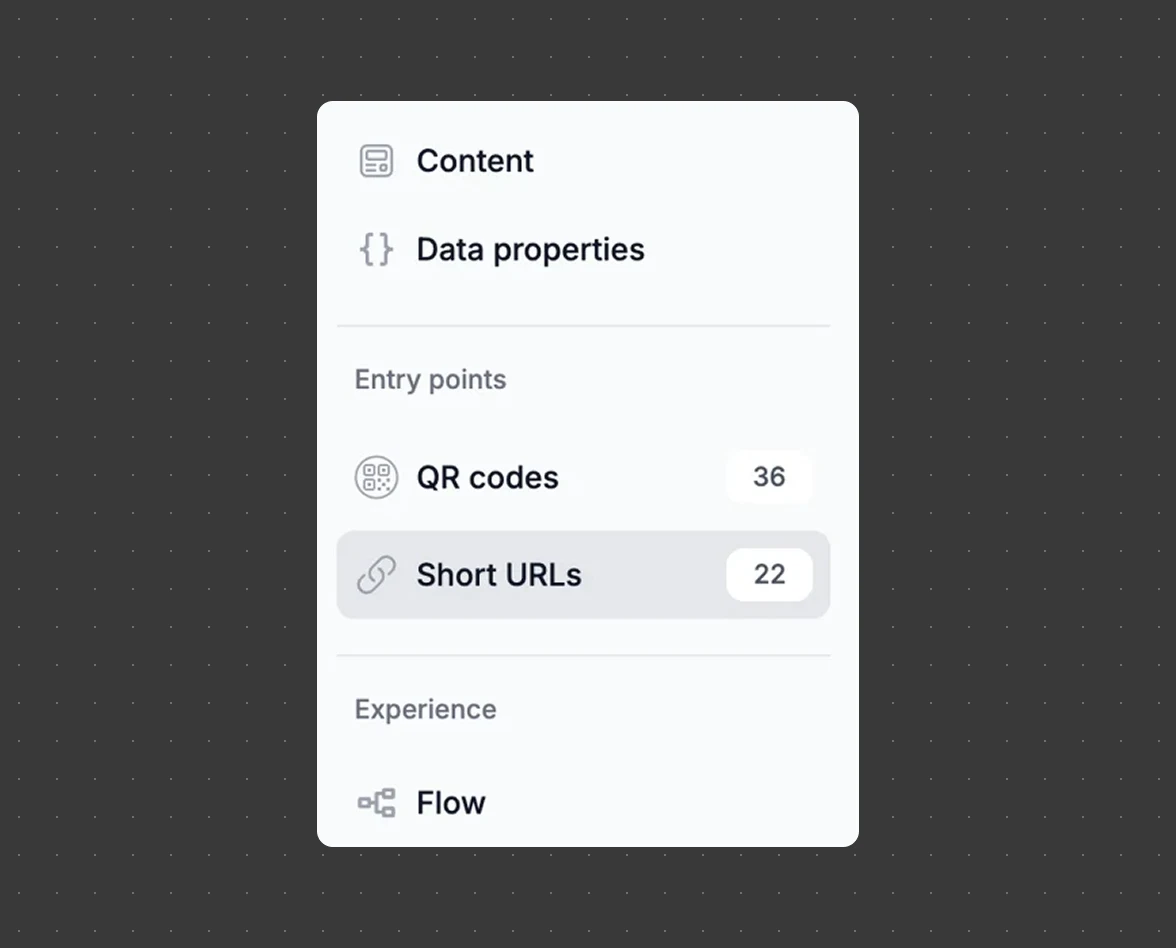
See the total number of entry points (QR codes, short URLs) inside a flow. Helps teams stay organized and maintain clean inventory.
December 2025
Custom Terms & Conditions
Admins can now create and manage workspace, or org-level, Terms & Conditions and privacy notices, ensuring campaigns follow your company’s compliance standards.
December 2025
Input Validation (Custom Form Rules)

Set custom validation rules on forms. For example, restricting responses to company email domains or defining allowed text formats. Helps improve lead quality and protect gated content.
December 2025
FlowID Marketo Leads Integration
FlowID can now sync contacts and contact properties directly to Marketo on a set cadence, enabling automated data alignment and smoother campaign management.
October 2025
FlowID Intelligence Suite
FlowID is Flowcode’s identity layer that unifies first-party data across every touchpoint. The new FlowID Intelligence Suite introduces advanced tools to help teams segment, personalize, and activate their data with more precision.
Custom Contact Properties
Create custom fields (e.g., loyalty tier, preferences) to capture the data your business cares about. These properties sync directly to each contact record and your CRM.
Smart Rules Powered by FlowID
Use FlowID contact properties to route users into tailored journeys. Build more personalized forms and experiences using key identifiers and persona traits.
Audience Builder
Define audiences using event-level and interaction data, view segment size instantly, and push them to your CRM for activation—ideal for targeted campaigns and persona development.
October 2025
Form Without Thank You Page
Create form experiences without a mandatory Thank You page—redirect users to any external destination immediately after submission.
October 2025
New Image Format Without Text
Add a clean image-only button module, ideal for visual-first landing pages where the image serves as the primary call to action.
October 2025
Hide Bot Traffic Toggle
Automatically filter bot traffic from analytics to improve data accuracy and ensure decisions are based on real engagement.
October 2025
Duplicating Codes Attached to Conversion Flows
When duplicating a flow, entry points can now be duplicated too—saving time and preserving setup consistency.
October 2025
Zapier Integration
Instantly sync collected contacts and form submissions to thousands of apps through Zapier, automating downstream workflows with ease.
October 2025
Duplicating Codes Attached to Conversion Flows
When duplicating a flow, entry points can now be duplicated too—saving time and preserving setup consistency.
October 2025
PURLs at Scale (via the API)
Generate personalized short links in bulk through the API using your naming rules—making high-volume personalization fast and automated.
October 2025
Fine Grained Permissions
Control exactly what each user can access or edit through more precise permission settings at both the org and workspace-level.
October 2025
Focal Points for Images

Ensure landing page images always crop correctly—automatically center the most important part of an image with a simple click.
August 2025
Scheduled Reports (PDF + CSV)
Automate recurring analytics reports across org, workspace, and flow levels. View, edit, and manage all scheduled reports in one centralized dashboard.
August 2025
Flow Editor Enhancements
A smoother, more flexible building experience with new tools for creating advanced customer journeys.
- Experience Builder: Add, edit, and optimize elements in a new intuitive canvas.
- Landing Page Modules: New customization blocks for contact sharing, media embeds, file uploads, and more.
- Changing Bundle Types: Swap bundle types mid-campaign without losing performance data.
- Conditional Logic: Route users to different pages or forms based on their responses.
- Dynamic Forms: Show or hide fields in real time based on user input to create more personalized, interactive flows.
August 2025
Turning Off Short URL Generation
Users can now toggle short URL creation at the flow level—ideal for QR-only campaigns.
August 2025
Data Share for Contacts Collected
A dedicated data table for all form submission data, accessible via:
- Snowflake (direct query)
- SFTP Server (downloadable CSV)
A full data dictionary is also available.
August 2025
Bulk Code Updates via API for Flowcode 2
New UpdateCodesInBatch endpoint lets you update up to 300 Flowcodes at once by modifying each code’s name and metadata fields.
View documentation here.
July 2025
Page performance
Flowpage URL: All Flowpages at flowcode.com/page/ will automatically redirect to flow.page/ for a faster and more reliable Flowpage experience.
May 2025
Self-Service API for Flowcode 2
Org Admins can now generate API tokens directly from the Org-level Profile menu. Easily manage secure integrations and streamline access with full control over authorized API usage.
May 2025
International Geo Analytics for Flowcode 2
Access detailed insights on scans and conversions outside the U.S. Now powered by expanded global IP coverage—see where your audience is engaging from virtually any country.
May 2025
PDF Export for Flowcode 2
Easily export analytics dashboards and reports as PDFs for seamless sharing and offline analysis. Perfect for internal reviews, presentations, and team collaboration.
May 2025
Read-Only Billing View for Flowcode 2
Org Admins now have visibility into billing activity with a read-only dashboard to view invoices, track FlowIDs, workspaces, and associated codes and assets.
May 2025
Bulk Code Updates via API for Flowcode 2
New UpdateCodesInBatch endpoint lets you update up to 300 Flowcodes at once by modifying each code’s name and metadata fields.
View documentation here.
March 2025
Org Level Analytics for Flowcode 2
Org Admins can now compare performance across workspaces, understanding full-funnel performance for consumer engagement across the entire organization.
March 2025
Org Level Audience Insights for Flowcode 2
Org Admins now have a new organizational level audience insights across brands and workspaces.
March 2025
Short URL Creation for Flowcode 2
Generated and sharable short links that lead to your conversion flow experiences now your extend reach to digital channels where scanning isn't possible.
March 2025
Short URL Customization for Flowcode 2
Create more professional and on-brand URLs using your own domain and customize the end of links with custom slugs.
March 2025
Workspace Analytics Views & Filtering for Flowcode 2
A redesigned workspace analytics dashboard allows for filter by conversion flow, folder, or tag. Dive deeper into insights and compare performance with ease.
March 2025
Moving Flows Between Workspaces for Flowcode 2
Conversion Flows and folders can now be moved within the same organization. This will transfer associated analytics and will be aggregated in the destination workspace with historical analytics remaining in the original workspace.
March 2025
Flowcode 2 Dev Portal
The Flowcode 2 Developer Portal is a centralized resource for developers to access extensive documentation, API references, and support materials that will be updated as more resources become available.
March 2025
Org Admin Invites for Flowcode 2
The invitation flow for Org Admins has been streamlined with a new Bulk User Invitation flow. Gain more control over user access with the ability to select specific workspaces for invited users.
February 2025
Left Nav Enhancements for Flowcode 2
Updates include an expandable and collapsible left navigation menu on the platform in additional to a global "Create" button within the left nav for easy access to the creation process.
February 2025
Bulk Code Creation for Flowcode 2
Save time and increase efficiency with the ability to generate QR codes at scale. Upload a CSV file to create large volumes of codes simultaneously.
February 2025
Bulk Code Download for Flowcode 2
Users can download multiple codes in the preferred file format (PNG, JPG, SVG, PDF, EPS) associated with a Conversion Flow in just a few clicks.
February 2025
Flow Duplication for Flowcode 2
Easily create copies of your existing Flows to streamline workflows and boost efficiency.
February 2025
Re-trigger Workspace Invites for Flowcode 2
Resend member invitations to pending team members at the Workspace Admin level in addition to the Organization Admin level.
February 2025
Org Level Roles for Flowcode 2
Simplification of roles at the Org level in Flowcode are as follows:
Org Admin: can access the "Organizational Admin" console in addition to all workspaces with the permissions of a "Workspace Admin".
Org User: Only has access to assigned Workspaces. They do not have access to the "Organizational Admin" console.
February 2025
Conversion Flow Creation Interstitial for Flowcode 2
Users will now be able to fill out critical Conversion Flow information before the creation of a flow for increased efficiency.
No items found.
September 2026
Custom Dashboards
Build and share insights without the need for a data engineering or analytics team. Custom Dashboards gives marketers and business users a self-service reporting platform to drag and drop charts, apply filters, and schedule reports all on their own.
September 2026
Bulk Dropdown Options
Form builders can now paste or bulk-load large option lists into dropdown fields in seconds, and consumers can search long dropdowns by typing to filter, making complex forms faster to build and easier to use.
September 2026
Form Results Tab
The Form Results tab has been redesigned to organize each form module into its own clearly labeled section, making it easier to see submission counts, filter by contact, and download results per module without sifting through a cluttered list.
July 2026
Data Property Types
Data properties can now be assigned a specific type (email, phone, URL, address, date, number, etc.), so they insert correctly into typed fields without triggering validation errors.
May 2026
Change your Primary Identifier
Align with your existing data systems and go beyond email with subscriber IDs, loyalty IDs, or hashed emails to identify your FlowID contacts.
May 2026
Shopify Revenue Pixel
Link your Flowcode connection data with your store's purchase activity and see the full journey from physical touchpoint to checkout.
May 2026
GS1 Code Templates
Flowcode supports GS1-compliant codes, enabling you to generate codes scannable by both consumer smartphones and retail/supply chain barcode scanners. No external tools or workflows required.
April 2026
Smart Rules for Modules
Extend the power of Smart Rules to individual modules within a flow, enabling personalized experiences at a more granular level. You can now apply logic, such as device type (iOS vs. Android), to dynamically adjust links and content, delivering smarter routing beyond the primary conversion path.
April 2026
Sweepstakes Form Enhancements
Sweepstakes forms now support submission limits, along with duplicate-entry prevention, giving you greater control over access and data quality. These settings can be configured directly in the Form Editor to define campaign windows, cap entries, and prevent repeat submissions.
April 2026
API and Bulk Import Improvements
Bulk imports and API code creation are now dramatically faster and more reliable. Large jobs that previously took 15–20 minutes now complete in seconds, while backend improvements prevent partial failures and reduce platform slowdowns during large imports.
January 2026
The Asset Library
The Asset Library introduces a dedicated hub within the new Assets tab for managing image assets within workspaces. Users can now bulk upload, organize images into folders, rename, archive, and manage assets with workspace-level permissions, creating a centralized and scalable system for asset organization and reuse.
January 2026
Post-Submit Communications
Post-Submit Communications enables automated email notifications triggered by CRM form submissions, configured directly in the Flow Editor. This feature helps brands quickly engage users after submission with personalized, conditional messaging, driving faster follow-up and higher conversion.
January 2026
Custom Tables
Custom Tables give you full control of your reporting by building the exact analytics view you need on demand. Choose your own dimensions and metrics to uncover deeper performance insights and go beyond standard dashboards with more granular analysis. Add Custom Tables to your scheduled reporting and skip the wait for custom exports or technical help, with instant self-serve reporting built right in.
Learn More
January 2026
Self-Service Pixel
We updated the Flowcode 2 Pixel to be fully self-serve, making it easy to generate and manage your tracking pixel directly in the platform. Set it up in minutes with no technical support required.
January 2026
Audience Builder Updates
The Audience Builder UI has been updated to make creating groups faster and easier. Group logic functionality has also been improved so contacts can be included regardless of whether they converted within the selected time frame.
January 2026
BYO OneTrust Footer Banner
Flowcode-owned pages now include persistent footer links for Cookie Preferences, Report, and Privacy to support OneTrust compliance. Clients with a DPA can override the Cookie Preferences and Privacy links with their own OneTrust-managed and privacy policy URLs.
December 2025
SmartFlow
SmartFlow automatically routes visitors to the best-performing landing page variant while your test is still running, reducing wasted traffic and lowering cost per acquisition. Ideal for product drops, game days, and seasonal campaigns that need fast optimization.
December 2025
Flow-Level Analytics Enhancements
A redesigned analytics view brings clearer insights. Simplified top-level metrics, updated conversion rate calculation (Conversions ÷ Visits), richer tables, including Total Conversion Rate and Module Conversion Rate, and new geo-data views and a detailed “Traffic Breakdown” section.
December 2025
Revenue Tracking for Conversion Pixel
You can now see transaction totals, quantities, and order numbers alongside conversions, making ROI measurement clearer and enabling smarter optimization.
December 2025
Scheduled Reports: Admin View & Results Tab
Admins can now view and manage all scheduled reports across orgs and workspaces, including ownership, cadence, and delivery settings. Improves visibility and continuity when team structures change. Scheduled reports can now include form results, with a new “Include results of the flow” toggle. Reports will include module-level CSVs for deeper insight into submissions.
December 2025
FlowID HubSpot Audience Sync
FlowID Audiences can now automatically sync to HubSpot Lists: keeping contacts, campaigns, and CRM data continuously aligned with no manual work.
December 2025
Asset Counts Within a Flow
See the total number of entry points (QR codes, short URLs) inside a flow. Helps teams stay organized and maintain clean inventory.
December 2025
Custom Terms & Conditions
Admins can now create and manage workspace, or org-level, Terms & Conditions and privacy notices, ensuring campaigns follow your company’s compliance standards.
December 2025
Input Validation (Custom Form Rules)
Set custom validation rules on forms. For example, restricting responses to company email domains or defining allowed text formats. Helps improve lead quality and protect gated content.
December 2025
FlowID Marketo Leads Integration
FlowID can now sync contacts and contact properties directly to Marketo on a set cadence, enabling automated data alignment and smoother campaign management.
October 2025
FlowID Intelligence Suite
FlowID is Flowcode’s identity layer that unifies first-party data across every touchpoint. The new FlowID Intelligence Suite introduces advanced tools to help teams segment, personalize, and activate their data with more precision.
Custom Contact Properties
Create custom fields (e.g., loyalty tier, preferences) to capture the data your business cares about. These properties sync directly to each contact record and your CRM.
Smart Rules Powered by FlowID
Use FlowID contact properties to route users into tailored journeys. Build more personalized forms and experiences using key identifiers and persona traits.
Audience Builder
Define audiences using event-level and interaction data, view segment size instantly, and push them to your CRM for activation—ideal for targeted campaigns and persona development.
October 2025
Form Without Thank You Page
Create form experiences without a mandatory Thank You page—redirect users to any external destination immediately after submission.
October 2025
New Image Format Without Text
Add a clean image-only button module, ideal for visual-first landing pages where the image serves as the primary call to action.
October 2025
Hide Bot Traffic Toggle
Automatically filter bot traffic from analytics to improve data accuracy and ensure decisions are based on real engagement.
October 2025
Duplicating Codes Attached to Conversion Flows
When duplicating a flow, entry points can now be duplicated too—saving time and preserving setup consistency.
October 2025
Zapier Integration
Instantly sync collected contacts and form submissions to thousands of apps through Zapier, automating downstream workflows with ease.
October 2025
Duplicating Codes Attached to Conversion Flows
When duplicating a flow, entry points can now be duplicated too—saving time and preserving setup consistency.
October 2025
PURLs at Scale (via the API)
Generate personalized short links in bulk through the API using your naming rules—making high-volume personalization fast and automated.
October 2025
Fine Grained Permissions
Control exactly what each user can access or edit through more precise permission settings at both the org and workspace-level.
October 2025
Focal Points for Images
Ensure landing page images always crop correctly—automatically center the most important part of an image with a simple click.
August 2025
Scheduled Reports (PDF + CSV)
Automate recurring analytics reports across org, workspace, and flow levels. View, edit, and manage all scheduled reports in one centralized dashboard.
August 2025
Flow Editor Enhancements
A smoother, more flexible building experience with new tools for creating advanced customer journeys.
- Experience Builder: Add, edit, and optimize elements in a new intuitive canvas.
- Landing Page Modules: New customization blocks for contact sharing, media embeds, file uploads, and more.
- Changing Bundle Types: Swap bundle types mid-campaign without losing performance data.
- Conditional Logic: Route users to different pages or forms based on their responses.
- Dynamic Forms: Show or hide fields in real time based on user input to create more personalized, interactive flows.
August 2025
Turning Off Short URL Generation
Users can now toggle short URL creation at the flow level—ideal for QR-only campaigns.
August 2025
Data Share for Contacts Collected
A dedicated data table for all form submission data, accessible via:
- Snowflake (direct query)
- SFTP Server (downloadable CSV)
A full data dictionary is also available.
August 2025
Bulk Code Updates via API for Flowcode 2
New UpdateCodesInBatch endpoint lets you update up to 300 Flowcodes at once by modifying each code’s name and metadata fields.
View documentation here.
July 2025
Page performance
Flowpage URL: All Flowpages at flowcode.com/page/ will automatically redirect to flow.page/ for a faster and more reliable Flowpage experience.
April 2026
Left Navigation Redesign
The Flow Editor navigation has been simplified by moving key controls directly into the canvas, removing the separate left-hand navigation panel. All entry points (QR codes and FlowURLs) and data properties are now visible in one unified and streamlined view.
May 2025
Self-Service API for Flowcode 2
Org Admins can now generate API tokens directly from the Org-level Profile menu. Easily manage secure integrations and streamline access with full control over authorized API usage.
May 2025
International Geo Analytics for Flowcode 2
Access detailed insights on scans and conversions outside the U.S. Now powered by expanded global IP coverage—see where your audience is engaging from virtually any country.
May 2025
PDF Export for Flowcode 2
Easily export analytics dashboards and reports as PDFs for seamless sharing and offline analysis. Perfect for internal reviews, presentations, and team collaboration.
May 2025
Read-Only Billing View for Flowcode 2
Org Admins now have visibility into billing activity with a read-only dashboard to view invoices, track FlowIDs, workspaces, and associated codes and assets.
May 2025
Bulk Code Updates via API for Flowcode 2
New UpdateCodesInBatch endpoint lets you update up to 300 Flowcodes at once by modifying each code’s name and metadata fields.
View documentation here.
March 2025
Org Level Analytics for Flowcode 2
Org Admins can now compare performance across workspaces, understanding full-funnel performance for consumer engagement across the entire organization.
March 2025
Org Level Audience Insights for Flowcode 2
Org Admins now have a new organizational level audience insights across brands and workspaces.
March 2025
Short URL Creation for Flowcode 2
Generated and sharable short links that lead to your conversion flow experiences now your extend reach to digital channels where scanning isn't possible.
March 2025
Short URL Customization for Flowcode 2
Create more professional and on-brand URLs using your own domain and customize the end of links with custom slugs.
March 2025
Workspace Analytics Views & Filtering for Flowcode 2
A redesigned workspace analytics dashboard allows for filter by conversion flow, folder, or tag. Dive deeper into insights and compare performance with ease.
March 2025
Moving Flows Between Workspaces for Flowcode 2
Conversion Flows and folders can now be moved within the same organization. This will transfer associated analytics and will be aggregated in the destination workspace with historical analytics remaining in the original workspace.
March 2025
Flowcode 2 Dev Portal
The Flowcode 2 Developer Portal is a centralized resource for developers to access extensive documentation, API references, and support materials that will be updated as more resources become available.
March 2025
Org Admin Invites for Flowcode 2
The invitation flow for Org Admins has been streamlined with a new Bulk User Invitation flow. Gain more control over user access with the ability to select specific workspaces for invited users.
February 2025
Left Nav Enhancements for Flowcode 2
Updates include an expandable and collapsible left navigation menu on the platform in additional to a global "Create" button within the left nav for easy access to the creation process.
February 2025
Bulk Code Creation for Flowcode 2
Save time and increase efficiency with the ability to generate QR codes at scale. Upload a CSV file to create large volumes of codes simultaneously.
February 2025
Bulk Code Download for Flowcode 2
Users can download multiple codes in the preferred file format (PNG, JPG, SVG, PDF, EPS) associated with a Conversion Flow in just a few clicks.
February 2025
Flow Duplication for Flowcode 2
Easily create copies of your existing Flows to streamline workflows and boost efficiency.
February 2025
Re-trigger Workspace Invites for Flowcode 2
Resend member invitations to pending team members at the Workspace Admin level in addition to the Organization Admin level.
February 2025
Org Level Roles for Flowcode 2
Simplification of roles at the Org level in Flowcode are as follows:
Org Admin: can access the "Organizational Admin" console in addition to all workspaces with the permissions of a "Workspace Admin".
Org User: Only has access to assigned Workspaces. They do not have access to the "Organizational Admin" console.
February 2025
Conversion Flow Creation Interstitial for Flowcode 2
Users will now be able to fill out critical Conversion Flow information before the creation of a flow for increased efficiency.